

To check if your website is privacy compliant, confirm four things: a privacy policy is linked on every page, analytics and advertising tags don't run before visitors consent (where the law requires opt-in), visitors can change their cookie choice later, and, if you use advertising pixels, US visitors can opt out of the "sale or sharing" of their data. A free website health check tests all of these automatically in about 30 seconds.
This guide explains what the main privacy laws expect from a business website, how to check your own site, and how to fix the most common gaps. It's practical guidance, not legal advice.
Key takeaways
- Under the GDPR and the EU and UK ePrivacy rules, non-essential cookies and trackers (analytics, ads) need opt-in consent before they run.
- California's CCPA/CPRA and other US state laws require clear notice, and an opt-out link if you "sell or share" personal data. Ad pixels often count.
- The most common failures are a missing privacy policy, tracking that loads before consent, and no way to change cookie choices.
- Google Consent Mode v2 lets Google tags respect visitors' choices and is required for many advertisers in Europe.
Which privacy laws apply to your website?
| Law | Who it protects | What it means for your website |
|---|---|---|
| EU GDPR + ePrivacy Directive | People in the EU/EEA | Opt-in consent for non-essential cookies; a clear privacy notice; rights to access and delete data |
| UK GDPR + PECR | People in the UK | Essentially the same as the EU rules |
| California CCPA/CPRA | California residents | Privacy notice; "Do Not Sell or Share" opt-out; honour Global Privacy Control |
| Other US state laws (Virginia, Colorado, Connecticut, Texas and more) | Residents of those states | Similar notice and opt-out rights, especially for targeted advertising |
| UAE PDPL and Saudi PDPL | People in the UAE and Saudi Arabia | Lawful basis and transparency for personal data, consent for many uses |
| Australian Privacy Act | People in Australia | An up-to-date privacy policy describing collection and use |
The laws usually apply based on where your visitors are, not where your company is. A US company with European visitors needs to think about GDPR. GDPR fines can reach 4% of global annual turnover.
The website privacy compliance checklist
1. A privacy policy linked from every page
Every law above expects a clear explanation of what you collect, why, who you share it with, how long you keep it and how people can exercise their rights. Link it in the footer so it's on every page. The App Store, Google Play and Google Ads require one too.
2. No tracking before consent (where opt-in is required)
In Europe, Google Analytics, Meta Pixel, LinkedIn Insight, Hotjar and similar tags must wait until the visitor clicks "Accept". Simply showing a banner isn't enough if the tags have already fired.
3. A real choice: reject as easy as accept
Regulators have fined sites for burying the "Reject" option. Offer Accept and Reject with equal prominence, and don't pre-tick boxes.
4. A way to change your mind
Consent must be as easy to withdraw as to give. A "Cookie settings" link in the footer that reopens the banner is the standard solution.
5. A US opt-out link if you use ad pixels
Advertising pixels can count as "selling or sharing" personal data under California and other US state laws. If you use them, add a "Do Not Sell or Share My Personal Information" (or "Your Privacy Choices") link and honour Global Privacy Control signals.
6. Cookie policy and terms
A cookie policy listing each cookie, its purpose and duration helps visitors make an informed choice. Terms of service set the rules for using your site and are expected if you sell online.
How to check your website automatically
Run your domain through the free website health check. The Privacy & Cookies section of the report shows:
- Which third-party trackers load on your homepage (analytics, ad pixels, session recording).
- Whether a consent management platform or Google Consent Mode is in place.
- Whether your server sets tracking cookies on the very first page load, before anyone can consent.
- Whether a privacy policy, cookie policy and terms are linked.
- Whether a US opt-out link is present when advertising pixels are detected.
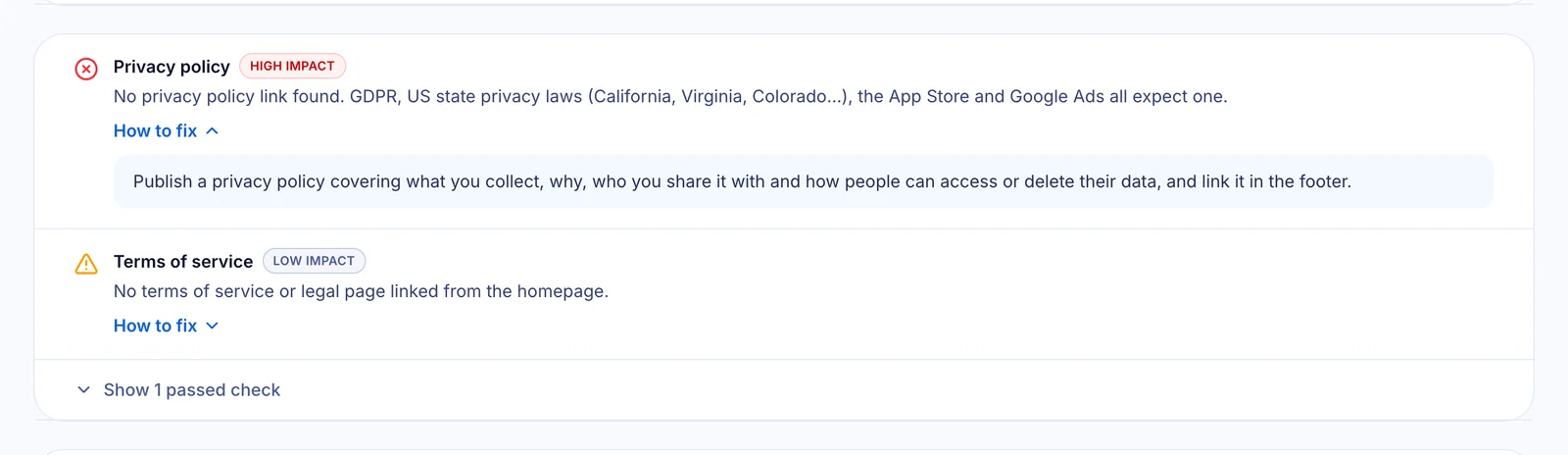
Each finding includes a plain-English explanation and how to fix it. The checks are a strong signal of common problems, but they're automated, so confirm your specific obligations with a qualified lawyer.
How to fix the most common privacy gaps
Publish a privacy policy that matches reality
Describe what your site actually does: contact forms, analytics, email tools, hosting providers and international transfers. Generic templates that mention data you don't collect (or miss data you do) cause more problems than they solve. You can see how we structured ours on our privacy policy page.
Load analytics only after consent
Use a consent banner that actually blocks tags until the visitor accepts, and set Google Consent Mode v2 defaults to "denied" before any Google tag loads. On our own site, Google Analytics doesn't load at all in Europe until a visitor accepts, and elsewhere it waits for the visitor's first interaction, which also keeps the page fast.
Make the banner fast and honest
A banner that pops in late can hurt your speed scores (it changes the screen after it has loaded), and a banner without a real Reject button can attract complaints. Render it with the page, give Accept and Reject equal weight, and link to your cookie policy.
Add footer links
Privacy Policy, Terms of Service, Cookie Policy and Cookie settings, plus "Your Privacy Choices" if you run ads. Four or five links cover most requirements.
Privacy compliance is also a technical problem
Most privacy failures aren't legal misunderstandings. They're implementation details: a tag manager that fires before consent, a plugin that sets cookies on page load, a banner that only hides itself. That's why a technical check is a useful first step. For broader product compliance, see our GDPR compliance checklist for software development.
Frequently asked questions
Do I need a cookie banner if I only use Google Analytics?
If you have visitors in the EU or UK, generally yes. Google Analytics uses non-essential cookies, so it needs opt-in consent there. Outside Europe, rules vary; many US state laws focus on notice and opt-out rather than opt-in.
Is a privacy policy legally required for a website?
In most cases, yes. If you collect any personal data (contact forms, analytics, newsletter sign-ups), GDPR, US state laws and many other regimes require a clear privacy notice.
What is Google Consent Mode v2?
It's a way for Google tags to adjust their behaviour based on the visitor's consent choice. Sites set default consent states (for example "denied" in Europe) and update them when the visitor chooses. Google requires it for advertisers who want to keep using certain features with European traffic.
What counts as "selling or sharing" data under US privacy laws?
Under California's CPRA, sharing personal data with third parties for cross-context behavioural advertising counts as "sharing", even without payment. Advertising pixels from social networks and ad platforms often fall into this category.
Can an automated tool tell me if I'm fully compliant?
No tool can guarantee legal compliance, but it can reliably detect the technical gaps regulators look for first: trackers loading before consent, missing policies and missing opt-out links. Use it as a first check, then confirm with legal advice.
Check your website's privacy setup now: run a free website health check. Free, with no sign-up.